Texts and packages
E-ZPass Scam (2026): Fake Toll Text Message — Don't Tap Pay
E-ZPass scam or E-ZPass text message scam about unpaid tolls? Don't tap. Does E-ZPass send texts? Verify in your real account first — never pay from SMS.
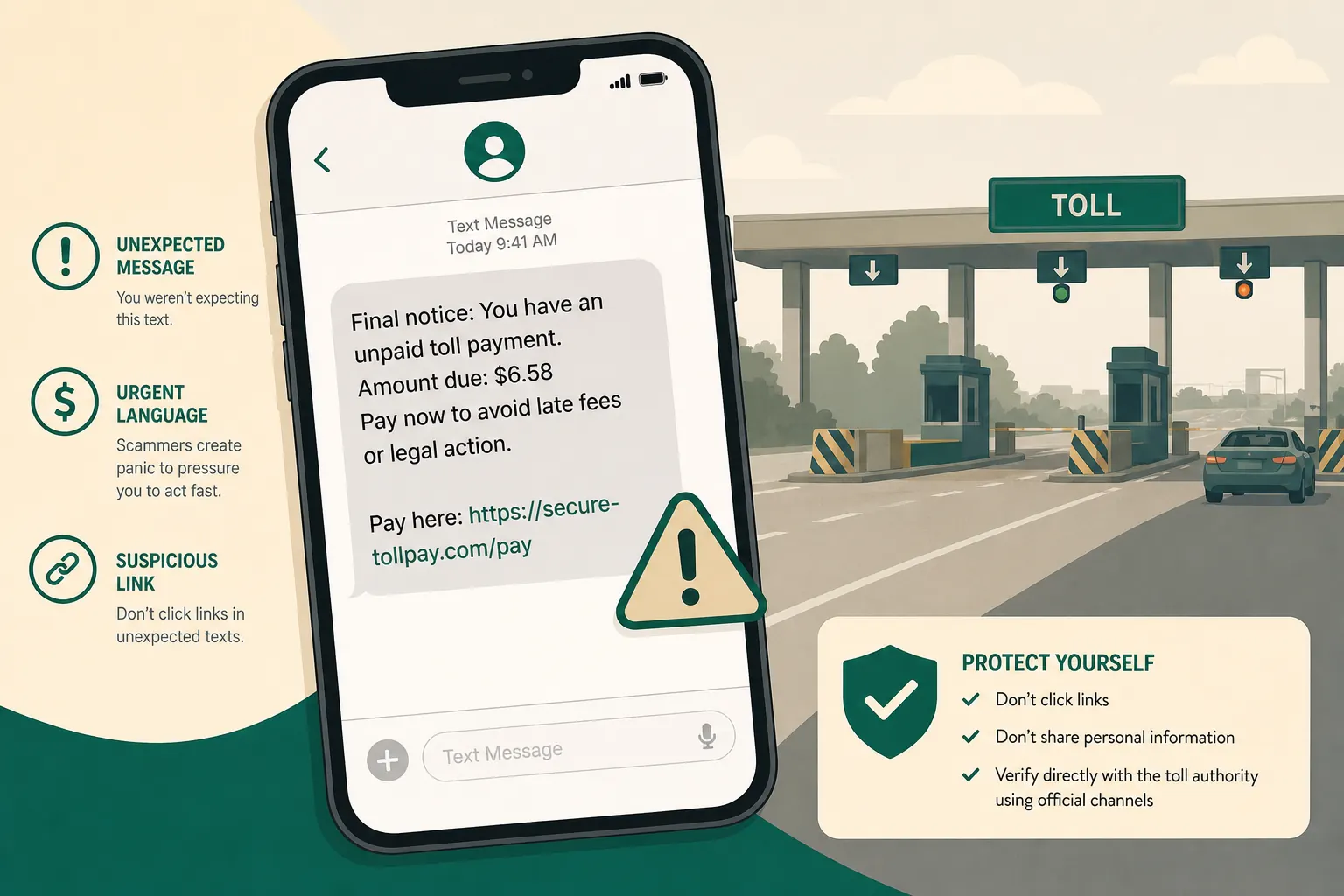
Short answer: An E-ZPass scam (also searched as e-zpass text scam, e-zpass toll scam, ez pass scam text, or toll scam texts) with a “pay now” link is almost always fake. Do not tap it. Does E-ZPass send text messages? Official programs can message some customers — but a cold unpaid-toll pay link is scam-first. Open your real E-ZPass or state toll account from a bookmark/app and check the balance. If nothing is due, delete and report the SMS.
A text lands: “Unpaid toll — pay now to avoid late fees.” Small amount. Familiar brand. Fake deadline. That is the whole product.
Does E-ZPass send text messages?
Sometimes — for account or payment alerts you set up. That does not mean every unpaid-toll SMS is real. Treat a cold E-ZPass text message scam as fake until your official E-ZPass (or state toll) account shows the same unpaid item. Never pay from the text link. Same rule for spellings people search: ezpass scam texts, e zpass scam, will ezpass ever text you.
What an E-ZPass scam wants
Most unpaid-toll texts are not about collecting a real $6 fee. They are about getting you onto a fake page fast enough to hand over:
- Card or bank details
- Personal information (name, address, license details in some kits)
- Enough data for later fraud or identity misuse
The dollar amount is intentionally small. Small amounts feel "annoying but believable," so people pay without investigating.
Real vs fake toll texts
| Real toll message | Fake toll text |
|---|---|
| Comes through an official app or account notice you already enabled | Arrives as a surprise SMS with a pay-now link |
| Refers you to your known account or mailed notice | Pushes you to click or reply immediately |
| Uses contact details you found yourself | Uses a link, number, or domain inside the message |
| Lets you verify through the official site or app | Tries to keep you inside the scammer's page |
Quick answers
FAQ
10 questions
Almost never when it arrives as a surprise SMS with a payment link. Confirm only inside the official E ZPass / toll account you open yourself.
How toll text scams work
- Delivery - You receive an SMS, and sometimes a lookalike email.
- Hook - "Unpaid toll," "account suspension," "final notice," or "avoid legal action."
- Click - A link or "reply Y for payment link" opens a fake site.
- Capture - You enter card details, license data, or other personal information.
- Abuse - Attackers charge cards, resell data, or attempt more fraud.
Some campaigns rotate domains constantly. The page can look polished. Polished design is not proof of legitimacy.
Brands scammers copy
Scammers impersonate names people already trust, including well-known regional systems such as E-ZPass-style brands, FasTrak, SunPass, and similar toll programs. They may also blend in "DMV," "motor vehicle," or "traffic violation" language.
You do not need to memorize every official domain. You need one habit: never use the link inside the unexpected text.
Why EZPass-style unpaid toll texts feel believable
Many texts are sprayed widely. You may get one after you recently used a toll road - or when you have not. Timing can be coincidence. Scammers count on that coincidence to make the story stick.
The dollar amount is intentionally small. Small amounts feel "annoying but believable," so people pay without investigating.
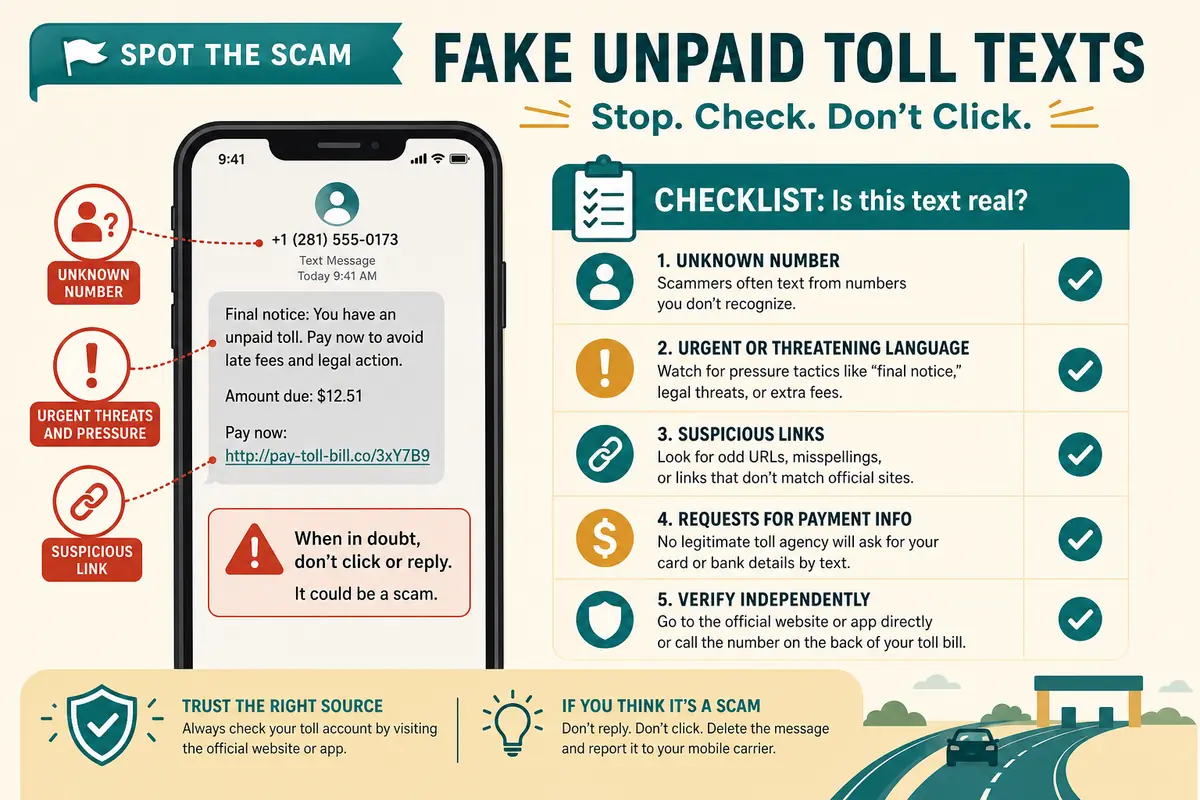
Red flags in the message itself
Look for pressure and shortcuts:
- Pay-now links in an unexpected SMS
- Threats about license suspension, tickets, or legal action
- Tiny balances designed to feel "not worth fighting"
- "Reply Y" to receive a payment link
- A state or toll system you never used
- Odd domains, extra hyphens, strange endings, or misspellings
- Generic greetings with no real account detail
- International or random-looking sender numbers
How real toll billing usually works
In most places, legitimate unpaid-toll processes rely on official channels such as:
- Mail notices to the vehicle's registered owner
- Your official online account or official app
- Customer service numbers published on the real agency site
Some agencies may send opt-in account alerts after you log in and enable notifications. That is different from a cold "pay this link now" text from nowhere. Even then, treat payment links in SMS with suspicion and verify inside the official site or app you open yourself.
A careful note about collections
In limited cases, overdue accounts can later involve collection partners. Those situations are still not a reason to trust a random SMS link. If a message claims collections, verify through the official toll agency site first, then use contact details published there.
The 30-second verify routine
Ask yourself:
- Was I expecting this text from an account I already manage"
- Does it demand payment through a link right now"
- Can I confirm the same balance inside the official website/app without using the SMS link"
- Does the story threaten my license or legal trouble over a tiny amount"
- Would this still make sense if I ignored it for an hour and checked officially"
If any answer feels wrong, stop.
Extra human tips that actually help
- Keep your official toll app on your home screen if you use tolls often.
- Save the agency's real customer-service page in bookmarks on your phone.
- If a relative forwards you a toll text, tell them the same rule: verify in the official app, ignore the SMS link.
- Treat "license suspension by text" as a major red flag. Serious government processes rarely start as a random SMS with a payment button.
Common mistakes that make toll scams succeed
Even careful people get caught by habits like these:
- Paying because the amount is "only a few dollars"
- Trusting a polished mobile page after one tap
- Calling a phone number printed inside the suspicious text
- Assuming "I did drive that route, so it must be real"
- Forwarding the link to a partner "to check" (which can spread the bait)
- Entering card details just to "see the invoice," then hoping to cancel later
The scam does not need you to be careless forever. It needs one rushed minute.
Step-by-step: what to do with a suspicious toll text
- Do not tap the link. Do not reply Y. Do not call numbers inside the text.
- Long-press / preview the URL if you want to inspect it - then close it.
- Open the official account yourself (bookmark, official app, or typed search for the real agency).
- Compare reality. Is there actually an unpaid toll"
- Report the SMS using your phone's report-junk option, or forward it to 7726 (SPAM) where supported.
- Delete the message after reporting.
- Tell family if similar texts are circulating - especially relatives who drive frequently.
Human tip that prevents most losses
Create a household rule: no payments from surprise texts. Not tolls, not deliveries, not "DMV fees," not "tax notices." Surprise + payment link = pause.
If you already clicked or entered details
Act quickly and calmly.
- Stop entering more information
- Close the page
- Contact your bank or card issuer and explain a possible phishing payment page
- Watch for unexpected charges
- Change passwords if you reused any credentials on the fake page
- Consider a credit freeze / fraud alert if you submitted sensitive ID details
- Report the incident through official fraud channels (for example FTC reporting tools, and IC3 when appropriate)
What "success" looks like for attackers
If you pay once, some crews try a second hit later: a follow-up text about "additional fines," "processing errors," or "refund verification." That is why reporting and deleting matters even after you avoided the first payment. You are training yourself - and protecting the next person who might receive the same template.
Related texts and lookalike scams
The same playbook appears as Florida SunPass text scams and in fake traffic-ticket or motor-vehicle texts: urgency, a fee, a link, a threat. If the message names New Jersey, an outstanding E-ZPass toll, MVC, or “reply Y,” use the dedicated NJ E-ZPass outstanding-toll guide. Government-looking language does not make a text trustworthy.
If you want a deeper checklist for suspicious websites after a click, see our guide on how to tell if a website is safe. For broader email patterns, see how to spot phishing emails.
Trusted sources
- Report fraud to the FTC
- FTC: how to recognize and report spam texts
- FTC: how to avoid a scam
- CISA: phishing guidance
Key takeaways
- Unpaid-toll SMS payment links are a common smishing pattern.
- Small dollar amounts and familiar brand names are bait.
- Do not pay or log in from the text.
- Verify through the official website or app you open yourself.
- Report junk texts and tell people who might tap first and think later.
- If you already shared details, contact your bank quickly and monitor accounts.
Was this guide helpful?
Tap like or dislike — one vote per visitor.
Comments
Share a tip or question. Keep it practical — no spam, links farm, or personal data dumps.
- Loading comments…